Usage Examples
Connecting to Two Serial Devices Using SI-60X2
The SI-60X2 can connect two serial ports over a network using a single unit.
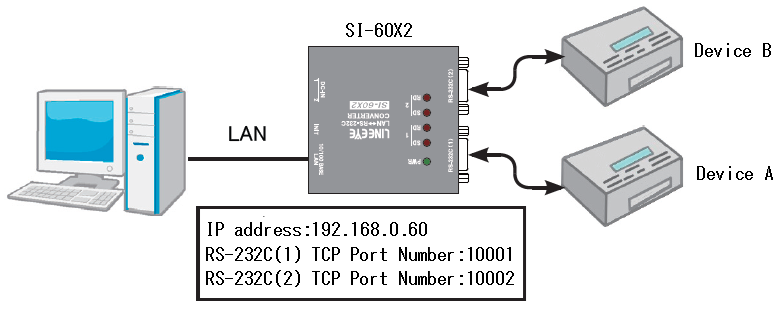
As shown in the diagram below, you can connect Device A to Port 1 and Device B to Port 2, and communicate with each device via virtual COM ports.
Connection Concept
SI-60X2 Main Unit Settings
Configure the SI-60X2 to operate as a server.
Set the IP address of the unit according to your network environment.
In this example, the IP address is set to "192.168.0.60". The TCP ports for listening are set to "10001" for Serial Port 1 and "10002" for Serial Port 2.
Configure the serial communication settings to match the connected serial devices.
SI-VCP Settings
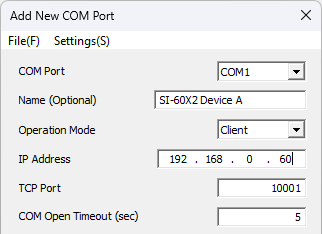
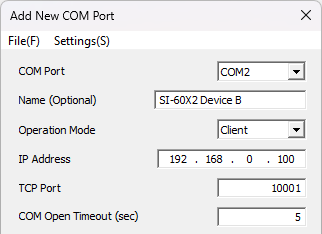
Create two virtual COM ports in SI-VCP as shown below, and configure them to connect to their respective TCP ports as a client.
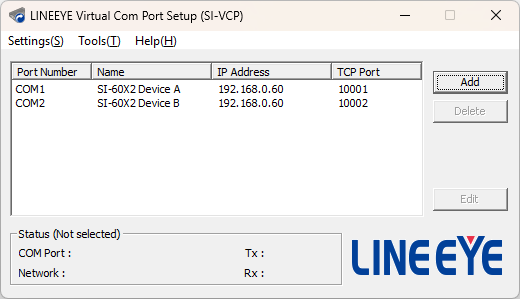
In the diagram below, COM1 is set for Device A and COM2 is set for Device B.
To make it easier to identify which COM port corresponds to which device after configuration, "Device A" and "Device B" are entered in the Name field.
|
Device A
|
Device B
|
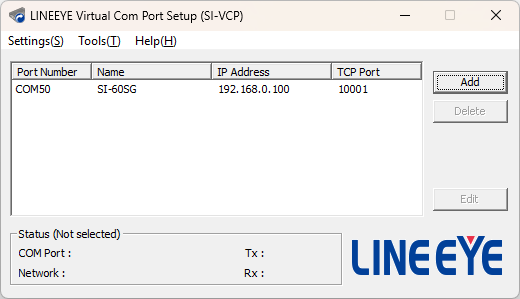
After configuration, the two virtual COM ports will be added to the list on the main screen.
Connecting to Remote Serial Devices Using SI-60SG and LA-SG100E
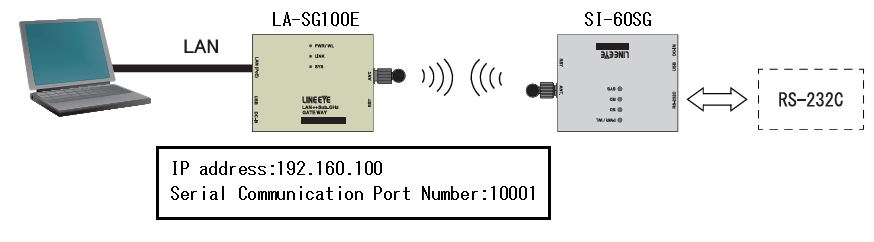
By using the SI-60SG and the LAN connection gateway LA-SG100E, you can communicate with remote serial devices via a virtual COM port.
Connection Concept
SI-60SG Main Unit Settings
Configure the wireless settings so that it belongs to the same group as the LA-SG100E, and set the "Destination Node" to the node number of the LA-SG100E.
Configure the serial communication settings to match the connected serial device.
LA-SG100E Main Unit Settings
The LA-SG100E operates as a server.
Set the IP address of the unit according to your network environment.
In this example, the IP address is set to "192.168.0.100".
Configure the wireless settings so that it belongs to the same group as the SI-60SG. In the serial communication gateway settings, set the "Destination Node" to the node number of the SI-60SG. The "Serial Communication Port Number" is set to "10001" in this example.
SI-VCP Settings
Create a virtual COM port for COM50 in SI-VCP as shown below, and configure it to connect as a client to the TCP port specified in the "Serial Communication Port Number" of the LA-SG100E.
To make it easier to identify the device corresponding to the COM port after configuration, "SI-60SG" is entered in the Name field.
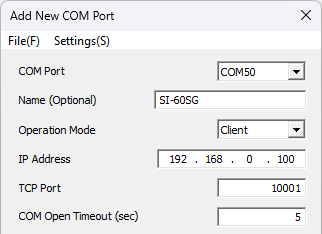
After configuration, the virtual COM port will be added to the list on the main screen.